🛠️ Setup
Requirements
To use Sherlo, ensure the following packages are installed:
react-native- version 0.64.0 or higher@storybook/react-native- version 7.6.11 or higher
Dependencies
To install Sherlo, run:
- npm
- Yarn
- pnpm
- Bun
- Deno
npm install @sherlo/react-native-storybook
yarn add @sherlo/react-native-storybook
pnpm add @sherlo/react-native-storybook
bun add @sherlo/react-native-storybook
deno add @sherlo/react-native-storybook
If your project has iOS native code, run:
cd ios- to navigate to the folderpod install- to install the iOS dependencies
Storybook Component
To enable Sherlo to navigate through stories, update the Storybook component
Storybook component is typically exported from .rnstorybook or .storybook at project root
import AsyncStorage from "@react-native-async-storage/async-storage";
import { getStorybook } from "@sherlo/react-native-storybook";
import { view } from "./storybook.requires";

const Storybook = view.getStorybookUI({
const Storybook = getStorybook(view, {
  storage: {
    getItem: AsyncStorage.getItem,
    setItem: AsyncStorage.setItem,
  },
});

export default Storybook;
Storybook Access
To enable Sherlo to access Storybook, choose one of these options:
- Standalone
- Integrated
Provide a build that opens straight into Storybook
import Storybook from "./.rnstorybook"; // Modified for Sherlo

export default function App() {
  return <Storybook />;
}
No app, no menu — Storybook only
Update your Root component to enable Storybook access:
- via Dev Menu or openStorybook()
- when testing with Sherlo
import { addStorybookToDevMenu, isStorybookMode } from "@sherlo/react-native-storybook";
import Storybook from "./.rnstorybook"; // Modified for Sherlo

addStorybookToDevMenu(); // Adds Storybook toggle to the Dev Menu

export default function App() {
  if (isStorybookMode) { // Checks if Storybook should be rendered
    return <Storybook />;
  }

  return <YourApp />;
}
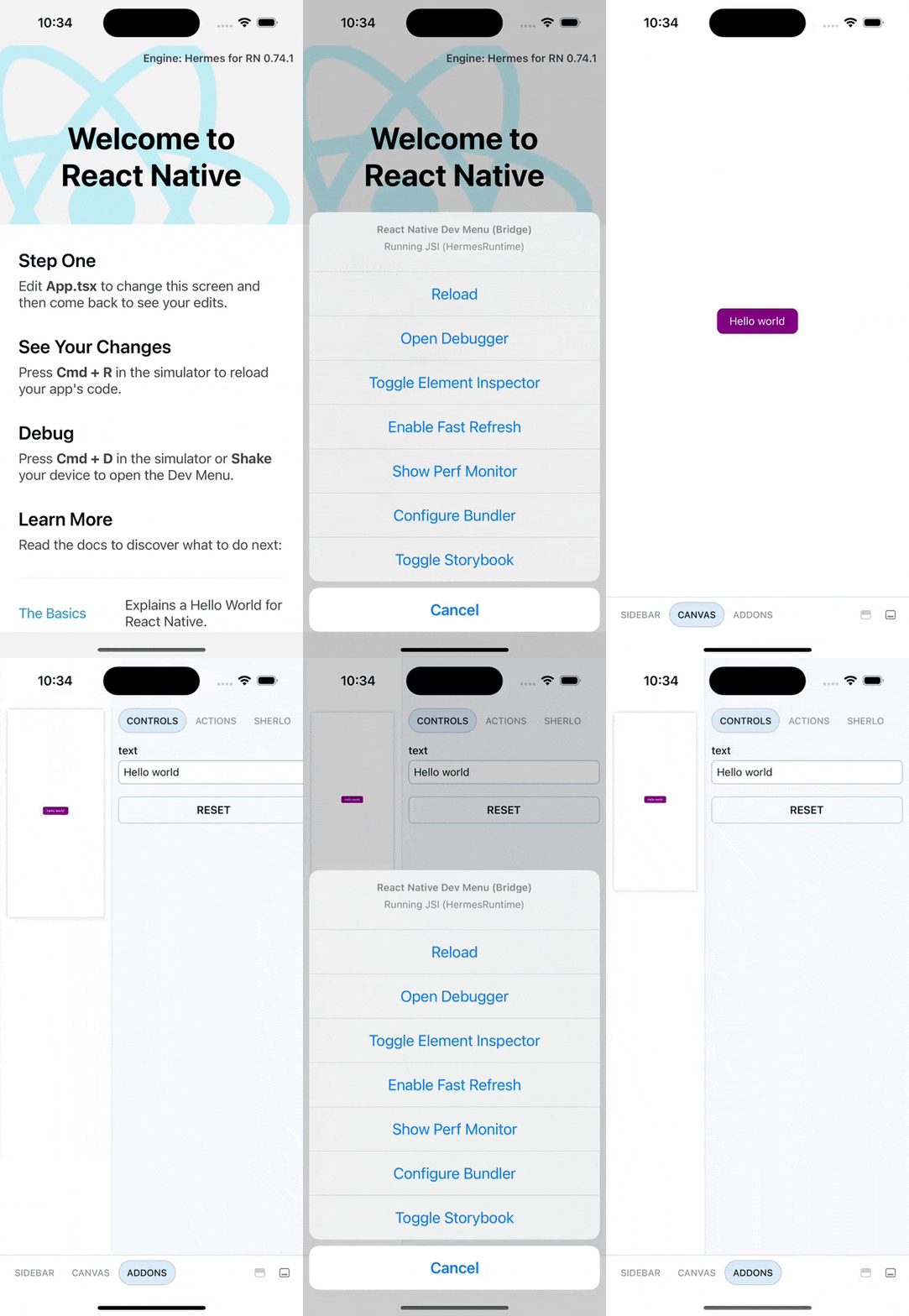
Access Storybook via Dev Menu or openStorybook()
Not supported by Expo Go, as it depends on native modules
Dev Menu - Available only in development builds
- Shake your device or press:
- iOS: Cmd ⌘+Ctrl+Z
- Android: Cmd ⌘+M
- Click
Toggle Storybookto show or hide Storybook
openStorybook()
Add a button to open Storybook using the openStorybook() function:
import { openStorybook } from "@sherlo/react-native-storybook";
import { Button } from "react-native";

function OpenStorybookButton() {
  return <Button title="Open Storybook" onPress={openStorybook} />
}
This is useful for internal distribution, as it can be accessed without running a development build